Bot Trail — Free Kids Coding Puzzle Game
Program Beeper Bot step by step to grab stars and reach the pad.
About Bot Trail
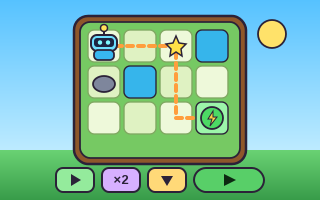
Bot Trail teaches sequential coding and planning in a cheerful garden puzzle world. Before Beeper Bot takes a single step, you map out the full journey using directional arrow tiles so the little robot avoids splashes and mossy rocks.
Across fifteen handcrafted island trails, grids expand from five-by-five paths to tricky six-by-six circuits with a handy repeat-two modifier. If Beeper hits a bump, your program stays right in the tray so you can debug and try again.
How to play
- Tap arrow buttons or press keyboard Arrows to queue Beeper's steps.
- On trail 8 and up, tap ×2 to double the last arrow command.
- Press RUN (or Enter) to watch Beeper collect every golden star.
- Reach the green charging pad across all 15 trails before losing three hearts.
Controls
- Keyboard & mouse
- Arrow keys add steps · 2 toggles ×2 · Backspace undoes · Enter runs
- Touch screen
- Tap arrows, ×2, Undo, Clear, and RUN buttons
Tips and tricks
- Trace the path with your finger before pressing RUN to save hearts.
- Use ×2 on long straight stretches to keep your command count small.
Bot Trail: frequently asked questions
How does Bot Trail introduce coding without reading code?
Children build a step-by-step sequence using visual arrow blocks and repeat-x2 modifiers before pressing RUN, learning planning, loops, and debugging just like real programmers.
What happens if Beeper Bot hits a rock or puddle?
Beeper returns to the start tile while keeping your saved steps intact in the program bar so kids can tweak one step and run again.