Picture Spell — Free Kids Spelling Game
Open the picture storybook and spell each friendly word!
About Picture Spell
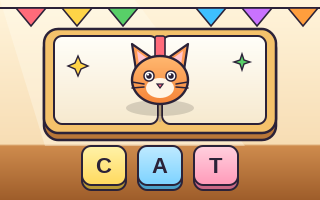
Picture Spell invites young readers to open Pippa Bunny's pop-up storybook and spell twelve friendly everyday words. Each page brings a bright animated illustration to life while magnetic letter tiles wait in the wooden tray below, starting with easy three-letter words such as CAT and SUN before growing into four-, five- and six-letter words.
Tap the magnetic letters in order or type directly on your keyboard to fill the spelling rail. When all slots are filled, the word checks automatically: a match bursts with rainbow stars, while any tricky spots wobble gently so you can fix them using your three hearts or the golden Hint star.
How to play
- Look at the animated picture inside Pippa Bunny's open storybook.
- Tap letter tiles in the tray (or type on your keyboard) to fill every slot.
- Tap a filled slot or press Backspace to take a letter back.
- Use the golden Hint button if you need help finding the next letter.
Controls
- Keyboard & mouse
- Type A–Z to place letters · Backspace to undo · or click
- Touch screen
- Tap magnetic letter tiles · Tap filled slots to undo · Tap Hint
Tips and tricks
- Say the picture name slowly out loud and listen for the first and last sounds.
- If a guess wobbles, green tiles stay locked in place so you only fix the red slots.
- Solve words without using the Hint button for the full 100-point round bonus.
Picture Spell: frequently asked questions
How is Picture Spell different from harder word games?
Picture Spell shows a clear storybook illustration above every word, starts with short three-letter words, locks green right letters on a check, and offers a glowing Hint star.
Can children play Picture Spell on both keyboards and touch screens?
Yes. Kids can tap colorful magnetic letter tiles on tablets or phones, or type letters directly on a computer keyboard.